

Your IndexNow API Key:
Generated in 3 Minutes,
Misunderstood for Years
Most tutorials stop at “copy the key and upload the file.” This one covers what actually happens after that — including the response codes that silently kill submissions and the Google question nobody answers cleanly.
The Bing Webmaster Tools dashboard makes it look trivial. Click “Generate,” download a text file, upload it to your root, done. That’s 80% of the tutorials you’ll find, and it’s mostly correct — but it skips the parts that actually matter: why your submissions are silently failing, what happens to that ping after it leaves your server, and the uncomfortable truth about Google’s relationship with this protocol that hasn’t changed since 2021.
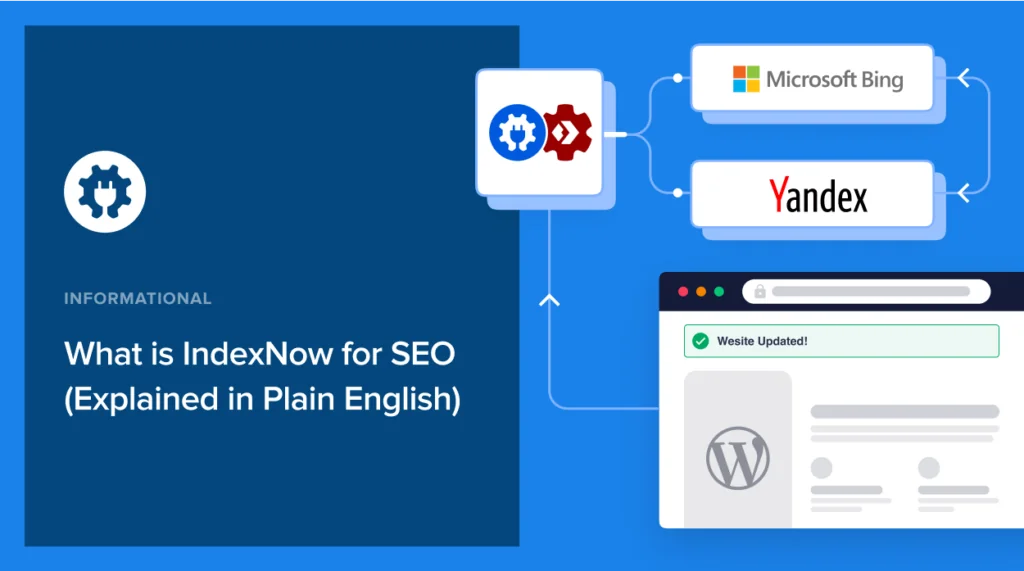
IndexNow was co-developed by Microsoft and Yandex and launched in October 2021 as a direct response to the crawl budget problem: search engines spending enormous resources re-crawling unchanged content while missing genuine updates. The protocol flips the model from pull to push. You notify; they crawl. One authenticated ping to any participating endpoint fans out automatically to every engine that has adopted the protocol.
Those numbers matter more in 2026 than they did at launch, because Bing’s index now directly feeds ChatGPT Search, Microsoft Copilot, and DuckDuckGo. If you care about AI citation — and in mid-2026, you should — IndexNow isn’t a “Bing SEO” tactic anymore. It’s how you get into the real-time data layer that AI assistants draw on.
What an IndexNow API Key Actually Is
The key is not a password in the traditional sense. It’s a domain ownership proof mechanism. When you submit a URL, the participating search engine checks your claimed key against a text file at the root of your domain. If they match, the submission is accepted. If they don’t — or the file doesn’t exist — you get a 403, silently, with no notification that anything went wrong.
Between 8 and 128 characters. Allowed characters: lowercase letters (a–z), uppercase letters (A–Z), numbers (0–9), and dashes (-). No spaces, no underscores, no special characters. The file at your root must be named [yourkey].txt and contain only that key as plain text — no BOM, no newline, no extra whitespace.
Fig. 1 — The same string serves as both the filename and the file’s sole content. That redundancy is intentional; the engine matches them to verify domain ownership.
The 128-character ceiling is rarely discussed, but the 8-character floor matters more: any key shorter than 8 characters triggers a 422 error from the endpoint. I’ve seen people generate short test keys with simple UUID tools and then spend an hour debugging what they think is a hosting issue.
Three Ways to Generate the Key (Ranked by Reliability)
Terminal — OpenSSL (Recommended for anyone who can open a terminal)
This is the fastest path with zero external dependencies. On Mac, Linux, or Windows Subsystem for Linux:
openssl rand -hex 32
Output: a 64-character hex string. Copy it. That’s your key. The -hex 32 flag generates 32 random bytes and encodes them as 64 hex characters — well within spec, cryptographically random, zero chance of duplicate. If you want shorter, -hex 16 gives you 32 characters, still valid.
Bing Webmaster Tools Generator (Recommended for WordPress/CMS users)
Navigate to bing.com/indexnow/getstarted. Hit Generate. Download the resulting .txt file directly — it’s pre-named correctly and contains only your key. The advantage here is that Bing provides the file ready to upload, which eliminates the most common mistake (incorrect file naming). This is the path I’d recommend to anyone managing a WordPress site without shell access.
WordPress Plugin — Auto-generation (Recommended for non-technical publishers)
The official IndexNow plugin for WordPress and plugins like All in One SEO, Rank Math, and Yoast SEO all generate and host the key automatically on installation. The plugin writes the key file to your public root and handles all submissions in the background — page creation, update, deletion. The trade-off: you lose visibility into exactly what’s being submitted and when, which matters if you’re troubleshooting indexing gaps on a large site.
The WordPress plugin also logs recent submissions and lets you manually retry failed ones — useful for large publishing operations where automatic retries aren’t enough.
Hosting the Key File — Where It Actually Goes Wrong
Generating the key takes thirty seconds. Hosting it correctly takes three minutes if you know what you’re doing, and thirty minutes if you don’t. Here’s the full mental model:
Your key file needs to sit at https://yourdomain.com/[yourkey].txt. Not in a subfolder. Not behind authentication. Not cached by your CDN with incorrect headers. When a search engine validates your submission, it performs a GET request to that exact URL and checks that the response body contains your key string.
Some Cloudflare security configurations block direct access to .txt files at the root, returning a 403 before IndexNow’s validator even reaches your origin. Check your Firewall Rules and Page Rules. Create an explicit “bypass” rule for [yourkey].txt if needed. This silent failure accounts for a surprising number of “my implementation doesn’t work” reports.
File permissions, if you’re on traditional hosting: 644. Publicly readable, not writable. Verify by pasting your key file URL in an incognito browser window. If you see your key string as plain text, you’re done. If you see anything else — a 404, a server error page, a redirect — fix it before testing submissions.
Fig. 2 — The key file lives at the same level as your index.php or wp-config.php. If you can access yourdomain.com/robots.txt, the key file should work at the same path pattern.
Submitting URLs — GET vs POST, and When to Use Each
The IndexNow API accepts two request types. GET works for individual URL testing; POST is what you’ll use in production for anything beyond a single URL.
GET — single URL, browser-testable
https://api.indexnow.org/indexnow
  ?url=https://yourdomain.com/your-new-page/
  &key=3d9f2a1b7c4e8f0a5b6c2d1e9f3a7b4c
You can paste this directly into a browser. A 200 response means received. A 202 means received and queued for processing. Both are success states. The distinction: 200 is immediate acknowledgement, 202 means the engine accepted it but will handle it asynchronously. Either way, you’re done on your end.
POST — bulk submissions up to 10,000 URLs
{
  "host": "yourdomain.com",
  "key": "3d9f2a1b7c4e8f0a5b6c2d1e9f3a7b4c",
  "keyLocation": "https://yourdomain.com/3d9f2a1b7c4e8f0a5b6c2d1e9f3a7b4c.txt",
  "urlList": [
    "https://yourdomain.com/page-one/",
    "https://yourdomain.com/page-two/",
    "https://yourdomain.com/page-three/"
  ]
}
The keyLocation field is optional if your key file is at the standard root path, but including it explicitly eliminates ambiguity and is good practice for complex hosting setups with subdirectory configurations.
Submit to api.indexnow.org or any single participating endpoint (including www.bing.com/indexnow). The protocol requires participating engines to share your submission with all others within the network automatically. You do not need separate calls per engine.
HTTP Response Codes — The Reference You Actually Need
The official documentation lists these, but without the diagnostic context that makes them useful. Here’s what each code means in practice:
| Code | Status | What it means | What to do |
|---|---|---|---|
| 200 | OK | Submission received and processed | Nothing. You’re done. |
| 202 | Accepted | Received, queued for async processing | Nothing. Also a success state. |
| 400 | Bad Request | Malformed JSON (missing comma, wrong field name, extra bracket) | Validate JSON with a linter before resubmitting |
| 403 | Forbidden | Key verification failed — file not accessible or key mismatch | Check file exists at root, is readable (644), content matches key exactly |
| 422 | Unprocessable Entity | Request format valid, but content invalid (URLs don’t match host, key too short, blocked by robots.txt) | Verify all URLs share the host domain; check robots.txt isn’t blocking submitted paths |
| 429 | Too Many Requests | Rate limit hit | Implement exponential backoff; batch URLs to reduce total call count |
The 422 is the one that causes the most confusion. It doesn’t mean your key is wrong — it means something about the URL payload is semantically invalid. The two most common causes: submitting URLs from a different subdomain than the host field specifies (e.g., host: "example.com" but URLs from blog.example.com), or submitting paths that your robots.txt disallows.
The Google Situation — Honest Answer
Google announced in October 2021 that it was “testing the potential benefits of the protocol.” As of June 2026 — nearly five years later — Google has not joined IndexNow. Google maintains its own crawl infrastructure (Googlebot), its own submission tool (Search Console URL Inspection), and a separate, limited Indexing API that only processes job postings and livestreaming content.
IndexNow does not help with Google indexing. For Google, you still need XML sitemaps, Search Console, and — for time-sensitive content — the manual “Request Indexing” button in URL Inspection. These are not the same workflow. Run them in parallel.
There’s a reasonable argument that Google’s reluctance is structural: their crawl infrastructure is a competitive moat. Adopting a shared push protocol reduces their differentiation. Whether they eventually join is a genuine unknown — and anyone who confidently predicts either outcome is guessing.
What’s not a guess: Bing’s index matters more in 2026 than it did in 2021. ChatGPT Search and Microsoft Copilot both draw on Bing’s real-time index. If your content needs to be cited by AI assistants — for brand mentions, product queries, news coverage — IndexNow is how you get into that data layer quickly. The audience for “Google SEO” and the audience for “AI visibility” are converging, and IndexNow is relevant to the second one in a way it wasn’t two years ago.
Fig. 3 — These are parallel workflows, not alternatives. Implementing IndexNow does not replace anything you’re already doing for Google.
What IndexNow Cannot Do (The Part Worth Reading Twice)
A 200 response from the IndexNow endpoint means one thing: the search engine received your URL notification. It does not mean your page will be indexed. It does not mean it will be indexed quickly. It does not override the engine’s quality filters.
If your submitted page has thin content, blocks crawlers via noindex meta tags, returns a non-200 HTTP status when the crawler arrives, or sits on a domain with a history of spam signals — it will not be indexed regardless of how many times you ping IndexNow. The protocol accelerates discovery. Quality determines whether discovery converts to indexing.
There’s also a subtle trap with canonical URLs. If you submit both https://yourdomain.com/page/ and https://yourdomain.com/page (with and without trailing slash), you may trigger duplicate submission logic at the engine level. Submit only canonical forms — whichever version your site declares in the canonical tag.
Submit: New pages, updated content, deleted pages (so engines remove them from index), canonical URLs only.
Don’t submit: Pages blocked by robots.txt, noindex pages, URLs you don’t control, the same URL repeatedly within a short window, CSS/JS/image assets, URLs from a different subdomain than your declared host.
Platform-Specific Notes (2026 State)
WordPress
Use the official IndexNow plugin by Bing Webmaster Tools. It auto-generates your key, hosts the file, and submits on publish/update/delete. For more control, Rank Math Pro and All in One SEO also implement IndexNow with additional submission logging. One issue to watch: a bug in the official plugin (as of early 2026) causes the admin dashboard script to reload constantly, slowing the backend. Worth checking the plugin changelog before installation.
Shopify, Wix, Cloudflare
All three have native IndexNow integrations as of 2025. Shopify and Wix handle it automatically — no configuration required if you’re on their hosted infrastructure. Cloudflare’s Crawler Hints feature transmits IndexNow signals on your behalf at the CDN edge. Check your Cloudflare dashboard under Speed → Optimization to confirm it’s active.
Custom / Headless Architectures
This is where a POST integration via your deployment pipeline makes the most sense. Trigger a bulk submission via API whenever your build process completes. Keep the key in an environment variable, generate the .txt file as a static asset during build, and submit your changed URLs as part of the CI/CD workflow. For sites on Vercel or Netlify, webhook triggers on successful deploy are the cleanest implementation.
PHP — minimal one-file implementation
function indexnow_submit(array $urls, string $key, string $host): int {
    $payload = json_encode([
        'host'        => $host,
        'key'         => $key,
        'keyLocation' => "https://{$host}/{$key}.txt",
        'urlList'     => $urls,
    ]);

    $ch = curl_init('https://api.indexnow.org/indexnow');
    curl_setopt_array($ch, [
        CURLOPT_POST           => true,
        CURLOPT_POSTFIELDS     => $payload,
        CURLOPT_RETURNTRANSFER => true,
        CURLOPT_HTTPHEADER     => [
            'Content-Type: application/json; charset=utf-8',
            'Content-Length: ' . strlen($payload),
        ],
    ]);
    curl_exec($ch);
    $code = (int) curl_getinfo($ch, CURLINFO_HTTP_CODE);
    curl_close($ch);
    return $code; // 200 or 202 = success
}
Verifying Your Submissions
After implementation, the only reliable place to verify submissions is Bing Webmaster Tools. Navigate to Reports & Data → IndexNow. You’ll see a submission log with timestamps, URLs submitted, and status outcomes. This panel also shows you whether the engine accepted your submissions or flagged errors at the batch level.
There’s no equivalent dashboard for Yandex, Naver, or the other participating engines — you’re trusting the protocol’s sharing mechanism, which works as documented. If Bing confirms receipt, the other engines received the notification.
For automated monitoring, log the HTTP response codes from your submission calls. Anything other than 200 or 202 warrants investigation. A sudden spike in 403 errors after working submissions typically means something changed with your key file accessibility — CDN rule update, hosting migration, or a WordPress plugin that accidentally removed the file.
The Real Return on This 15 Minutes
The indexing speed improvement on Bing, Yandex, and other participating engines is real and measurable — typically moving from days to hours or minutes for new content. For sites publishing time-sensitive content (news, product launches, deal pages), that delta is meaningful.
For most content sites running on WordPress with a plugin, IndexNow is a 10-minute one-time setup that runs silently forever. The edge case complexity — CDN rules, canonical traps, response code debugging — only surfaces if you’re running a high-volume publishing operation or a custom architecture. For everyone else, install the plugin, confirm the key file is accessible, and move on.
The thing worth sitting with: Bing’s index in 2026 is not just Bing search. It’s the data layer for an expanding constellation of AI-powered search surfaces. Every minute your content sits undiscovered by that crawler is a minute it’s missing from ChatGPT’s retrieval pool. IndexNow closes that gap as fast as the protocol allows.
Google will either join eventually or they won’t. Either way, the protocol works today on the engines and AI surfaces that are actually growing.
For a broader overview of technical SEO tools and indexing strategies, SEOHack.info covers the current indexing landscape including Search Console workflows and crawl budget optimization in more depth.