
The most disorienting SEO experience isn’t a penalty. It’s silence. You publish something solid, the sitemap is clean, Search Console shows the URL was discovered — and then weeks pass with “Discovered – currently not indexed” staring back at you. This isn’t random. There are specific, diagnosable reasons Google keeps skipping your content, and most of them stack. Fix one without fixing the others and nothing changes.
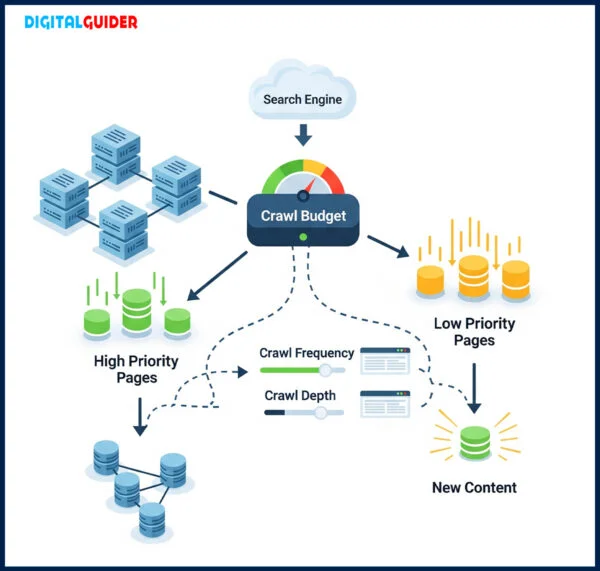
Before running through each reason, one thing worth understanding: “indexing” is not a binary switch Google flips after reading your page. It’s the output of a prioritization system. Google has over 1.09 billion websites competing for Googlebot’s attention, and it allocates crawl resources like a budget. Pages that look expensive to crawl or unlikely to be worth indexing get deferred — sometimes indefinitely.
The 17 reasons below are grouped loosely around three root causes: technical barriers that block access, signal failures that reduce priority, and content signals that make Google question whether your page deserves shelf space at all. Most struggling sites have problems in all three categories simultaneously.
The indexing pipeline. Most content stalls at stage 02 — not because of a block, but because of insufficient priority signals.
The Doors You Left Locked
Technical barriers are the cleanest category — they’re either there or they aren’t. But they’re also the most embarrassing, because Google isn’t ignoring you out of judgment. It’s being physically prevented from entering, often by a setting a developer touched six months ago and nobody reviewed since.
This is the most common “invisible wall” problem. A Disallow: / rule applied to an entire directory, a CMS migration that overwrote the robots file, a staging environment configuration that leaked to production — any of these will cause Google to respect your file and stay out, silently. There is no error in Search Console. The URL just sits in “Discovered – currently not indexed” with no explanation.
Fetch your live robots.txt directly in a browser and read every Disallow line. Then use Google’s robots.txt tester in Search Console to verify whether Googlebot is blocked from specific URLs. Check after every major site migration or plugin update — both are common moments when this file gets rewritten unexpectedly.
Disallow rule that covers content you want indexed. Validate and submit. Developers routinely add <meta name="robots" content="noindex"> during staging or testing, then forget to remove it. Some page builders — Elementor is the most common offender I’ve seen — have a “Search Engine Visibility” toggle that defaults to hidden on duplicated templates. The page looks normal in a browser. Google reads the tag and walks away.
Inspect source on every new page before calling it published. Also check the HTTP header — some WordPress SEO plugins send X-Robots-Tag: noindex in headers rather than HTML, which won’t appear in the source view. Use a header checker tool or curl to verify.
curl -I https://yoursite.com/page — look for X-Robots-Tag in the response. In the HTML: Ctrl+F "noindex" in page source. Remove or change to “index, follow”. If your page’s canonical tag points to a different URL, Google will consolidate signals to that other URL and potentially not index yours at all. This gets messy with paginated content, filtered category pages, and multilingual setups. A self-referential canonical (rel="canonical" pointing to the page’s own URL) is correct and fine. But a canonical pointing to an outdated slug, a homepage, or a 301-redirect destination will quietly route authority away from your new content.
A sitemap isn’t mandatory for Google to find content — but for new pages with no external backlinks and no strong internal linking, it’s the primary discovery mechanism. If your CMS has a sitemap plugin configured to only include posts above a certain word count, or if there’s a caching issue where the sitemap XML still shows last week’s content, your new URL is invisible to Googlebot’s discovery process.
Also watch the <lastmod> tag. Google’s own documentation recommends including it and keeping it accurate — not setting it to a static date in 2024 because the plugin defaulted that way.
/sitemap.xml and Ctrl+F your new page’s slug. If it’s missing, check your SEO plugin’s exclusion rules. Re-submit the sitemap in GSC after any significant publish. Googlebot is polite. If your server is slow or intermittently unavailable during a crawl window, it reschedules — and that reschedule might not happen for days or weeks. Google Search Console’s Crawl Stats report will show “Server Availability” issues if this is happening. A Time to First Byte above 800ms is a known risk factor. Shared hosting during traffic spikes is a common culprit.
Google renders JavaScript, but it does so in a secondary wave — sometimes hours or days after initial crawl. If your page’s body content is loaded client-side via JS (common in React/Vue SPAs, lazy-loaded comment systems, or tab-based layouts), Google may have indexed a near-empty version. This is invisible to you in a normal browser but visible if you test the URL in GSC’s URL Inspection tool and choose “View Crawled Page.”
In March 2026, Google removed some outdated JS-specific accessibility guidance from its SEO docs. The signal: JS rendering remains a real consideration, but the responsibility for proper rendering is increasingly on the publisher.
Google Found You. Then Chose to Wait.
This is where most content stalls — not blocked, just deprioritized. Google knows the URL exists and has decided to get to it eventually. “Eventually” can mean months if you don’t push on these signals.
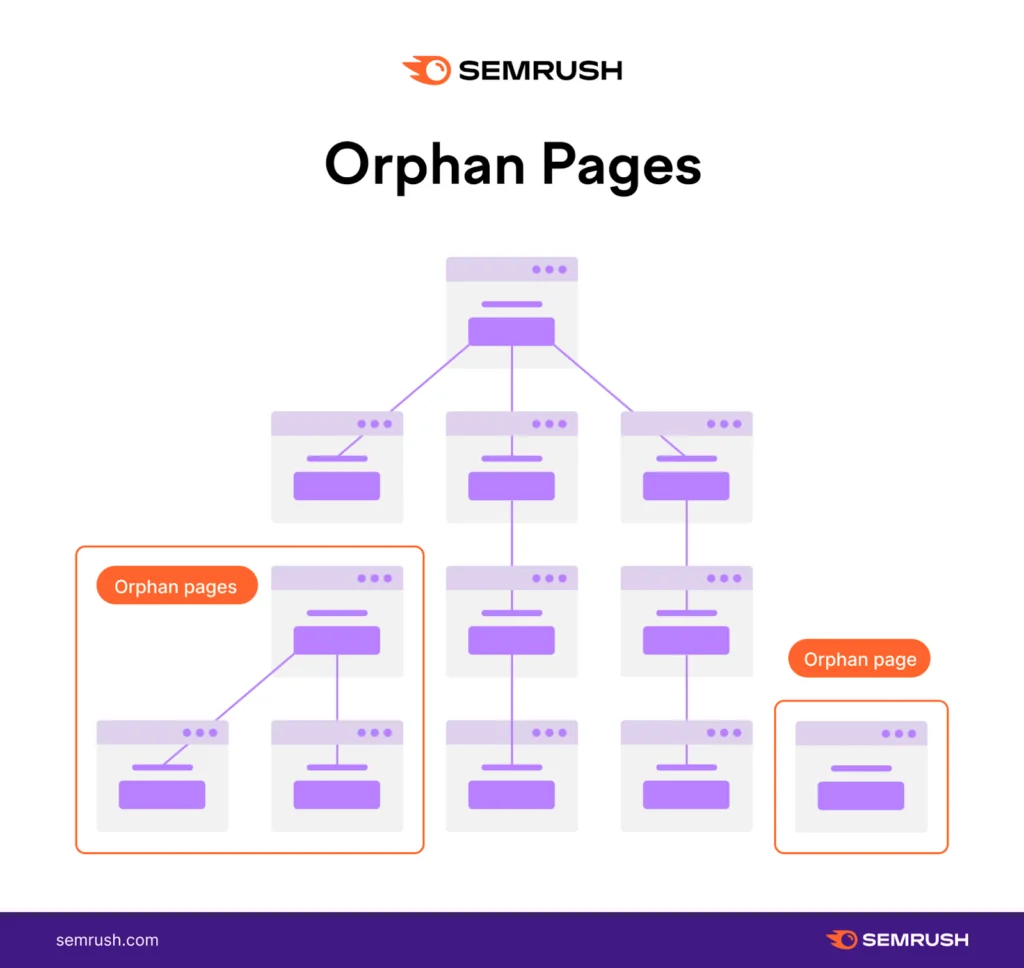
Internal links are how PageRank flows through your site. They’re also how Googlebot navigates — it follows links, not just sitemaps. A page with zero internal links from other pages looks structurally unimportant. Google’s own documentation confirms that page importance, determined partly by the number and quality of internal links, influences crawl priority. Pages with no links get queued behind everything else indefinitely.
The fix isn’t complex but requires intention: add 3–5 contextual internal links from already-indexed, relevant pages the moment you publish. Not a “Related Posts” widget. Actual in-text links from body copy where the connection is natural. Case studies report 60–80% faster indexation from increasing internal links from 1–2 to 5–10 on a target page.
Crawl depth matters. Pages that require 4, 5, or 6 clicks to reach from the homepage get lower crawl frequency. On a site with a shallow crawl budget, they may not get crawled at all during a standard Googlebot pass. This is a structural issue rather than a content issue — the page might be excellent, but it’s been architecturally deprioritized by its position.
Flat architecture — where most content is accessible within 2–3 clicks — consistently outperforms deep nested structures for indexing speed, particularly on newer or lower-authority domains.
Crawl budget is the combination of two things: how fast Googlebot can crawl your server (crawl rate limit) and how much Google actually wants to crawl your site (crawl demand). If Googlebot is spending its allocated crawl slots on tag archives, pagination, session IDs, faceted navigation parameters, or filter combinations that generate thousands of near-duplicate URLs — it’s using up the budget before reaching your new content.
One e-commerce client I reviewed had 40% of their crawl budget consumed by faceted navigation pages that no user ever searched for and no editor ever created. Resolving it with a combination of robots.txt disallow rules and canonical tags for parameter URLs accelerated indexing significantly for their actual product pages.
Backlinks remain one of the strongest signals of page value in Google’s crawl prioritization algorithm. A page with no external backlinks, on a young domain with low authority, is sending every signal that suggests it should be deferred. Even one contextually relevant external link from a real site can tip the balance — it’s not about the quantity, it’s about whether any external entity has vouched for the page’s existence.
This is particularly acute for new sites. As of 2026, Google has made indexing a privilege that new sites must earn, and external trust signals are a primary mechanism for that earning process.
Google evaluates the ratio of indexed to submitted pages. If less than 50% of your submitted sitemap URLs are indexed, that ratio is a signal of site-wide quality or crawl problems. In this state, new pages inherit the stigma — Google treats the entire domain as a lower-priority crawl target. The canonical diagnostic is the Coverage report in GSC: look at the “Excluded” count relative to “Valid.”
Google’s May 2026 Core Update (confirmed via Search Status Dashboard on 21 May, rollout completing around 4 June) reinforced E-E-A-T signals without introducing new vertical-specific penalties. The practical effect: ranking well and being cited in AI Overviews are now partially separable goals. A page that ranks fifth but provides a clean, direct-answer structure may be cited above pages that outrank it. A page that isn’t indexed at all is not in either race.
The Judgment Call Google Makes After It Reads
This is the hardest category to fix, because the problems here aren’t technical checkboxes. They’re editorial judgments. Google has gotten considerably better at evaluating whether a page adds information that doesn’t already exist in its index — or whether it’s restating what millions of other pages have already said.
In 2026, word count is irrelevant. Google evaluates something closer to “information gain” — what does this page add to what’s already in the index on this topic? A 4,000-word article that covers the same ground as the top 10 results, just rearranged, fails this test. A 600-word piece with two original data points from your own experience passes it more easily.
The surge of AI-generated content in 2025 and 2026 has made Google’s threshold here measurably higher. Google already has the generic version of your article, produced by a language model, on approximately 400 other domains. Your piece needs to contain something those don’t — a proprietary observation, a real case study, a counterintuitive finding, or a specific failure mode that requires actual domain experience to articulate.
Google explicitly classifies bulk-generated content as “scaled content abuse” — their term for producing many pages primarily to manipulate rankings rather than serve users, whether via AI tools, templates, spinning, or scraping. To enforce this, Google reportedly deployed significant manual review capacity to train classifiers on identifying low-quality AI content.
The important nuance: this isn’t an AI-content ban. AI assistance in research, structure, and drafting is fine. What fails is automated output at scale without genuine human editorial judgment, original perspective, or real expertise layered in. The difference is detectable by the presence of proprietary insight — something that could only come from someone who has actually worked in the domain.
Internal duplication is harder to spot than external. A blog post and its category archive. A product page and a filtered variant. A guide and a “beginner version” of the same guide. When Google finds two pages on your own domain that are substantively similar, it picks one to index and ignores the other. The winner isn’t always the one you want. The loser — your new content — gets “Crawled – currently not indexed” or simply never gets crawled at all.
In 2026, with AI-generated content producing large numbers of structurally similar pages at scale, this problem has intensified for content-heavy sites that publish variations on similar topics.
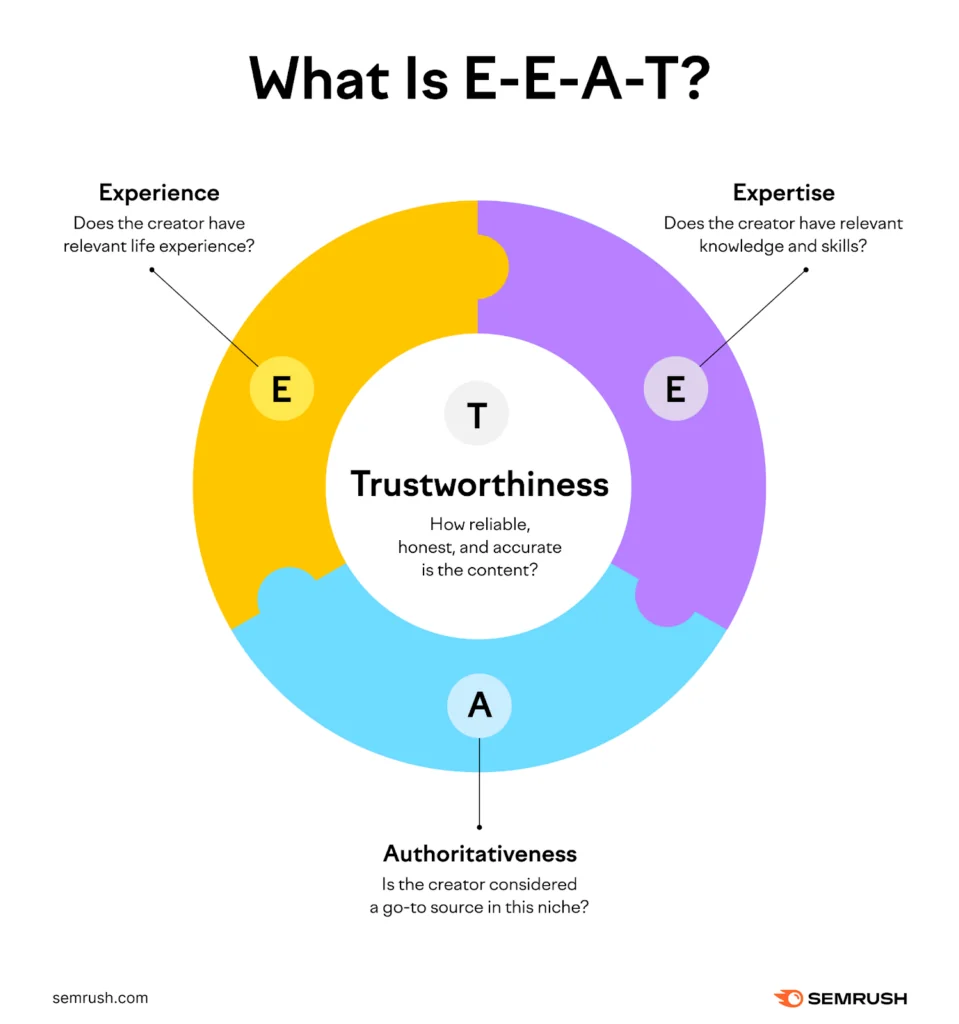
Google’s quality raters use E-E-A-T (Experience, Expertise, Authoritativeness, Trustworthiness) as their primary evaluation framework, and this maps to machine signals that influence indexing priority. A page with no author attribution, no author bio, no credentials, no “About” page linking author background, and no external citations is a page with no trust anchors.
As of 2026, there are reports that Google has begun cross-referencing author names against professional profiles and public registrations — particularly for health, finance, and legal content. Even outside YMYL topics, named authorship with verifiable external presence is a measurable differentiator. An analysis cited 187% average visibility gain for sites that integrated verified author profiles.
Person markup. Link the author to their LinkedIn or professional profile. For Google to trust who’s writing, the author needs a verifiable digital footprint outside your own domain. Google’s indexing decisions aren’t purely technical — they involve a judgment about whether a page is likely to be useful for search queries. A page that targets a keyword but satisfies a completely different intent from what searchers actually want sends weak relevance signals. If the query is transactional and your page is purely informational, or vice versa, Google may index it but bury it. For pages with no other strong signals, a clear intent mismatch can contribute to deprioritization.
The April 2026 update specifically strengthened intent-signal weighting: content that targets broad keywords without matching the specific reason someone is searching lost ground, even when technically well-optimized.
A single, isolated article on a topic that your site has never covered before faces a credibility gap. Google’s March 2026 Core Update data showed that sites publishing comprehensively within a single subject area — covering every sub-topic and multiple content formats — significantly outperformed broad sites that touched many topics at shallow depth. A standalone article is weaker than one surrounded by a connected group of relevant pages on the same subject.
This is the topical authority argument applied to indexing: Google gives more crawl priority to content that exists within a coherent topic cluster where your site has already proven relevance. Publishing one article on “Google indexing” when your site has no other SEO content is a harder climb than publishing it when you have 40 related articles already indexed.
Where to Look First — by Symptom
| GSC Status You See | Most Likely Causes | Priority Check |
|---|---|---|
| Discovered – currently not indexed | Low crawl priority: internal links weak (R7), crawl budget wasted (R9), low site quality ratio (R11) | Immediate |
| Crawled – currently not indexed | Content quality judgment: thin content (R12), intent mismatch (R16), no E-E-A-T (R15), near-duplicate (R14) | Immediate |
| Excluded by noindex tag | Tag left in from staging (R2), plugin toggled incorrectly | Fix today |
| Blocked by robots.txt | Accidental Disallow rule (R1), migration overwrote file | Fix today |
| Alternate page with proper canonical | Canonical pointing to wrong URL (R3), duplication issue (R14) | Investigate |
| Page indexed but not ranking | Intent mismatch (R16), thin content (R12), topical isolation (R17), E-E-A-T gap (R15) | Next sprint |
| Valid page — indexed | No indexing problem. Check ranking signals separately. | Clear |
A simplified diagnostic decision tree. Most indexing failures have a primary root cause in one category and a secondary one in another.
The 48-Hour Recovery Checklist
If you publish this afternoon and want to maximize the probability of indexing within the week, run these in order. None of them guarantee indexing — nothing does — but collectively they eliminate the most common failure modes.
- Open GSC URL Inspection on the new page. Note the exact status before changing anything.
- View page source in browser: Ctrl+F “noindex” — confirm zero results.
- Run
curl -I [your-page-url]and check for X-Robots-Tag header. - Confirm the URL appears in your live sitemap.xml.
- Check canonical tag in page source — confirm it points to this exact URL, not a redirect or a similar page.
- Add 3–5 internal links from relevant, already-indexed pages within body copy (not footers or sidebars).
- Verify page is within 3 clicks from homepage.
- Confirm the page loads in under 2 seconds on a mobile connection.
- Test in GSC’s URL Inspection → “View Tested Page” screenshot — confirm all content is visible, not blank.
- Request indexing in GSC after resolving any issues found above.
- Post the URL on one external channel (social, forum, newsletter) to generate a behavioral signal that someone cares the page exists.
Clicking “Request Indexing” repeatedly without fixing the underlying cause is the most common waste of time in this process. Google allows 10–100 manual requests per day depending on your account — but if the root signal problem is unchanged, the request gets deprioritized again. Fix the cause, then request once.
The 2026 reality: Google operates two evaluation pathways simultaneously. Being indexed is the prerequisite for both.
The Uncomfortable Implication
Every one of these 17 problems is fixable. What’s harder to fix is the mindset that produces them: publishing as the finish line, not the starting gun. The sites that consistently index fast — and rank well once indexed — treat every piece of content as a node in a network, not an isolated document. They check technical hygiene before publishing. They ensure the new page is linked from three existing pages on day one. They write something that their own experience generated, not something their AI tool assembled from pattern-matching on the top results.
The sites that struggle have a different workflow. Publish. Submit sitemap. Click “Request Indexing.” Check the next day. Click again. Wonder why nothing’s happening. The answer is almost always in this list — usually in reasons 7, 9, or 12 working in combination.
One last constraint worth naming: Google’s indexing behavior is not fully transparent or consistent. You can do everything on this list correctly and still wait three weeks on a low-authority domain. The goal isn’t certainty. The goal is removing every friction point that gives Google an excuse to defer you — so when it does visit, there’s nothing left to reject.
Google’s own crawl budget documentation at developers.google.com/crawling/docs/crawl-budget is still the most authoritative source for understanding how Google allocates crawling resources. It’s short, worth reading directly, and more nuanced than most summaries of it. For tracking active algorithm updates, Google’s Search Status Dashboard is the only official source — everything else is interpretation.